



Frequently Asked Questions
Topics covered in this FAQ include:
OSIP Online Services
- Question: What are the system requirements to use OSIP Online Services?
Answer: OSIP Online Services supports Microsoft Edge, Internet Explorer (IE8-11 or later version), Chrome, Firefox, and Safari. Please Note: OSIP Online Services does not support the "Autofill" feature of these browsers. - Question:
What is OSIP Online?
Answer: OSIP Online Services is an online system that allows existing Self-Insured Employers, Actuaries, Third Party Administrators and Group Administrators to file and submit their required documents online. - Question: What types of things can be done in OSIP Online Services?
Answer: OSIP Online Services is for existing self-insured employers, group administrators, Third Party Administrators, and Actuaries. It provides these existing entities a place to submit documents online.- OSIP Employers and Group Administrators can:
- select or change an actuary
- submit financial statements
- access the Self-Insurer's Annual Report e-filing system
- OSIP Group Administrators can also submit Core Member Data
- OSIP Public Employers and JPAs can:
- access the Self-Insurer's Annual Report e-filing system
- Actuaries can:
- submit Actuarial Summaries & Studies
- update their profile
- de-select employers
- OSIP Employers and Group Administrators can:
- Question: Are there user guides available for OSIP Online Services?
Answer: Yes, user guides may be found on the Forms, Publications, and Reports page. - Question: How do I get access to OSIP Online Services?
Answer: Existing Self-Insured Employers, Actuaries, Third Party Administrators and Group Administrators can use the same username and password that was used to file the previous year’s reports. The employer’s username will always be your certificate number. There is only 1 username login per self-insured employer. You can reset your password here - Question: What size files can I attach to submissions?
Answer: One PDF up to 15MB can be attached to each financial statement or actuary summary & study submission. Please email your attachment to OSIP@dir.ca.gov if your file is larger. - Question: What guidance is there for using OSIP Online Services?
Answer: At the top of each page is general guidance or requirements related to the screen information displayed underneath
The tool provides error messages for invalid entries
Tips will display while hovering over
Whenever a successful update is made the user will see a confirmation screen and receive a confirmation email.
User guides also contain helpful tips and instructions - Question: What if I do not receive a confirmation email?
Answer: Please contact OSIP via email at OSIP@dir.ca.gov - Question: Why am I getting an error message when I use the browser back button?
Answer: OSIP Online has its own navigation options built into the application. Please do not use the navigation buttons your browser provides once you are logged in. - Question: What are the rules for entering monetary numbers?
Answer: Convert figures into US dollars and round to the nearest dollar. - Question: Why am I getting a "System Error" message?
Answer: This is a generic message that may be triggered by numerous issues. If you get this error upon logging in, log out and wait for 30 minutes before trying to log in again. After 30 minutes, the OSIP Online Services will automatically unlock your account. Another type of error occurs occasionally that requires the cache of your browser to be cleared. The easiest way to do this is to close and open your browser. Please note you will lose anything entered into the application up to that point.
Actuaries
- Question: This is my first time registering with OSIP Online as an Actuary. How can I do that?
Answer: Email OSIP@dir.ca.gov for the first time Actuary Registration form - Question: I am trying to register as a new Actuary with OSIP. What do I do if I don't see my designation in the pull-down list?
Answer: The new Actuary Registration form is meant to combine the practical need for contact information and reflect regulatory qualifications. The regulations are very specific as to which professional designations are required to meet the minimum qualifications (http://www.dir.ca.gov/t8/15209.html). Therefore, within the form itself, OSIP is asking about and tracking only the designations mandated as meeting the regulatory qualifications. There are many other professional designations which can be earned and included in the written study, but they are not required for Actuary Registration. - Question: How is the Actuarial Summary & Study online form different than the hardcopy version I did previously?
Answer: One difference is the seven certification questions asked previously to ensure qualification to submit actuarial summaries & studies, has been reformatted so you only have to answer one time for all certification questions. - Question: What if I do not see my client listed in the pull-down menu of the Actuarial Summary & Study screen?
Answer: This means the employer has not yet selected you as the current actuary. Please contact the employer directly to discuss making their update to the system. - Question: If I update my Actuary profile with a new actuarial firm, are my client notified?
Answer: No. There is not an automated notification from OSIP Online to your clients if you change Actuarial Firms.
Financial Statements
- Question: How many financial statements can self-insured groups submit through OSIP Online?
Answer: Unaudited financial statements are due March 1st and can be submitted as often as needed before July 1st or until an audited statement has been filed, whichever comes first.
Audited financial statements can only be submitted once and are due July 1st. - Question: Which financial years can a private employer submit financial statements for?
Answer: Submissions will be accepted for financial year end dates between January 1 of the prior year and the current date.
Senate Bill 863
- Question: What do the new regulations require of California Self-Insurers?
Answer: All group self-insurers must submit an actuarial study and an actuarial summary by April 15th of each year. All private self-insurers must submit an actuarial study and an actuarial summary by May 1st of each year. All actuarial studies must use a valuation date of December 31 of the previous year. - Question: Who must file an actuarial study?
Answer: Current and former private and group self-insured employers must file an actuarial summary and study annually. Employers do not have to submit an actuarial study if their most recently filed OSIP annual report has either (1) 10 or fewer open claims or (2) less than $1,000,000 of total estimate future liabilities.
Public entities (cities, counties, and school districts) are not required to file actuarial studies. - Question: When did these requirements go into effect?
Answer: Senate Bill 863 and OSIP's emergency regulations became effective on January 1, 2013. - Question: Which actuaries are qualified to do this?
Answer: A qualified actuary must be independent, have current experience making California workers' compensation actuarial projections, have a minimum of $1 million of professional liability and E&O insurance coverage, and have one of the following professional designations; Fellow of the Casualty Actuarial Society (FCAS), or be a member of the American Academy of Actuaries (MAAA), or a member of the Society of Actuaries who is qualified to sign a statement of actuarial opinion on loss reserves. - Question: How will this affect my security deposit?
Answer: The Actuarial Study will include reserves, net of specific excess, IBNR, ALAE and ULAE. Actuarial studies are reviewed by OSIP and security deposits may be amended as a result. - Question: What if I already have an actuarial study, but it is not valued as of December 31st?
Answer: It is possible to use an earlier valuation date than December 31st if the analysis projects the liabilities to December 31st. This is typically done when the actuary starts the analysis prior to the end of the year. The actuarial report, however, must compare the projected values with the actual values noted in the Self-Insurer's Annual Report, which is valued as of December 31st. Specifically, the actuary should make sure that the projected values through December 31st are not significantly different from the actual values. - Question: Do I still need to complete an OSIP Annual Report and submit financial statements if I file an actuarial summary and study?
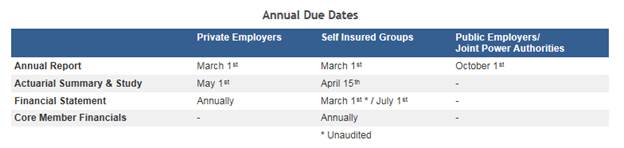
Answer: Yes. The reports below are required for existing self-insured employers. Each report is a separate requirement and collects different information.
Audits
- Audit FAQs may be found at https://www.dir.ca.gov/osip/AuditUnit/Audit-FAQ.html
May 2026